
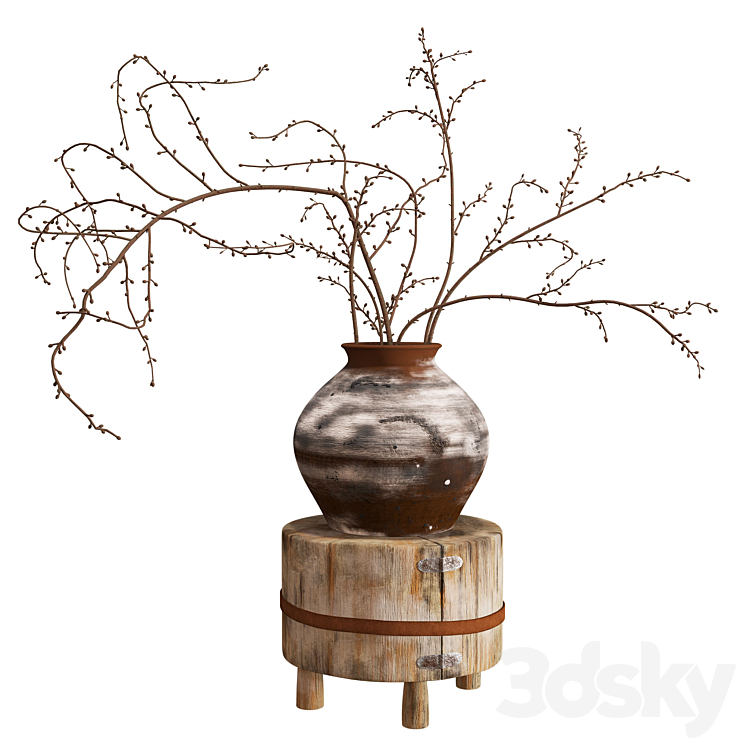
In recent months, dried bouquet 3D models, especially when paired with rustic wooden stands, have emerged as a subtle yet powerful trend across platforms like 3dsky, GreatCatalogue, and CGTrader. With the growing popularity of wabi-sabi, Japandi, and organic modern interior styles, digital artists and architects are leaning into these earthy, timeless elements to add realism and warmth to their visualizations.
But what makes these models so desirable? And how can you build them in a way that captures their raw beauty?
🌿 Why Dried Bouquets Are Trending in 3D Modeling
Unlike vibrant floral arrangements, dried plants evoke emotion through minimalism, texture, and natural asymmetry. They’re the perfect object to create visual pause in highly designed interiors. When combined with a handcrafted wooden stand — aged, cracked, or bound with rope or metal — they tell a story of imperfection and artistry.
These models are in high demand for:
✅ Modern rustic interiors
✅ Wabi-sabi inspired spaces
✅ Virtual staging for real estate
✅ Product and set design visualizations
🛠️ Modeling the Dried Bouquet in SpeedTree
While SpeedTree is typically used for trees, it’s also an excellent tool for creating thin dry stems, branches, and buds.
Key Tips for SpeedTree:
- Use twigs or leaf generators to simulate dried branches. Disable leaf clusters and instead add individual “leaf cards” to mimic tiny dried flowers or buds.
- Randomize curvature and rotation using noise and wind to achieve a natural irregular flow.
- For dried effect, adjust the leaf texture to muted tones like ochre, pale brown, or olive-gray. Use translucency maps for realism.
- Export with low-poly settings and bake normals to optimize performance in 3ds Max.
🪵 Building the Wooden Stand in 3ds Max
The wooden stand is just as important as the bouquet. It adds contrast in material and weight, anchoring the lightness of the dried branches.
Tips for 3ds Max Modeling:
- Start with a low-poly base using box modeling for the main structure.
- Use FFD (Free-Form Deformers) or manual vertex tweaking to create slight warps and cracks in the wood.
- Add multi-layered textures: combine a wood base with bump maps, dirt overlays, and slight gloss variation for realism.
- Consider adding binding elements like rope, leather, or metal for handcrafted character.
- Use UVW mapping and real wood photo references (even scanned textures) to keep the grain believable.
🔄 Balancing Stylization & Realism
These models don’t need to be overly complex to be effective. The goal is to balance detail with composition — clean, beautiful silhouettes, believable material definition, and just enough imperfection to feel handcrafted.
🧠 Final Thoughts
In the world of CGI, sometimes the quietest objects speak the loudest. Dried bouquets on rustic wooden stands are more than just props — they are sculptural statements that convey mood, taste, and depth.
By combining SpeedTree’s power in organic modeling and 3ds Max’s control over texture and form, you can create 3D models that not only sell — but inspire.
 Art Azi Designs
Leave a comment